


In this guide, we’ll show you how to create advanced segmentation in Heyloyalty using our Segment Builder. If you don’t need advanced segmentation, you can always read more about general segmentation in our guide “Create a Segment.”
With our Segment Builder, you can exclude recipients and divide segments into subgroups to narrow down your audience and target it more precisely. In addition, you can use existing segments and personas in your rules, making it easy to create precise segments.
Segment Structure
A segment in Heyloyalty is structured as follows:
- Segment
- Rule
- Criteria
- Rule
The above shows that a segment consists of rules, which consist of criteria. This means that when you create a segment, you create one or more rules for that segment, and those rules consist of criteria.
However, you can also create a segment where your criteria consist of subrules. A subrule is a criterion that contains rules, which in turn contain criteria.
You create a subrule when you insert a segment into your criterion. In such a case, the segment will be structured as follows:
- Segment
- Rule
- Criteria
- Subrule
- Criteria
- Rule
In Heyloyalty, a segment with subrules would look like this:
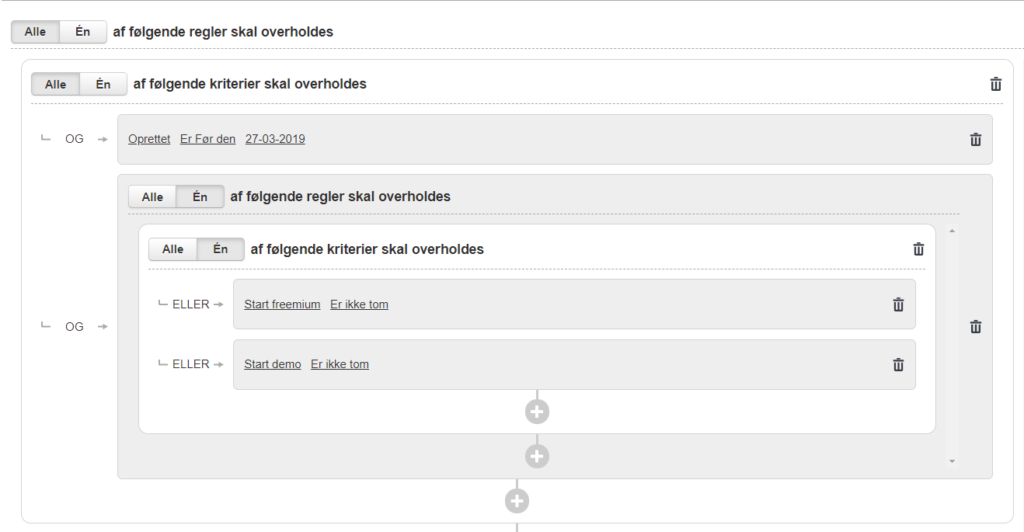
Here you can see that there is a criterion “Created before March 27, 2019”; following that, a segment containing two criteria has been inserted.
Read here to learn how to create a segment.
And/Or Segmentation
With “And/Or” segmentation, you can be extremely precise in your segmentation, allowing you to create relevant and targeted communications that deliver results for your business. Specifically, “And/Or” segmentation is a way for you to determine whether “All” or “One” of the rules and criteria in your segment must be met.
Example of how you can use “And/Or” segmentation:
You want to send the message to all women between the ages of 25 and 30 or between 40 and 50. In addition, you also want to send it to women who are interested in “Offers.”
In Heyloyalty, it will look like this:
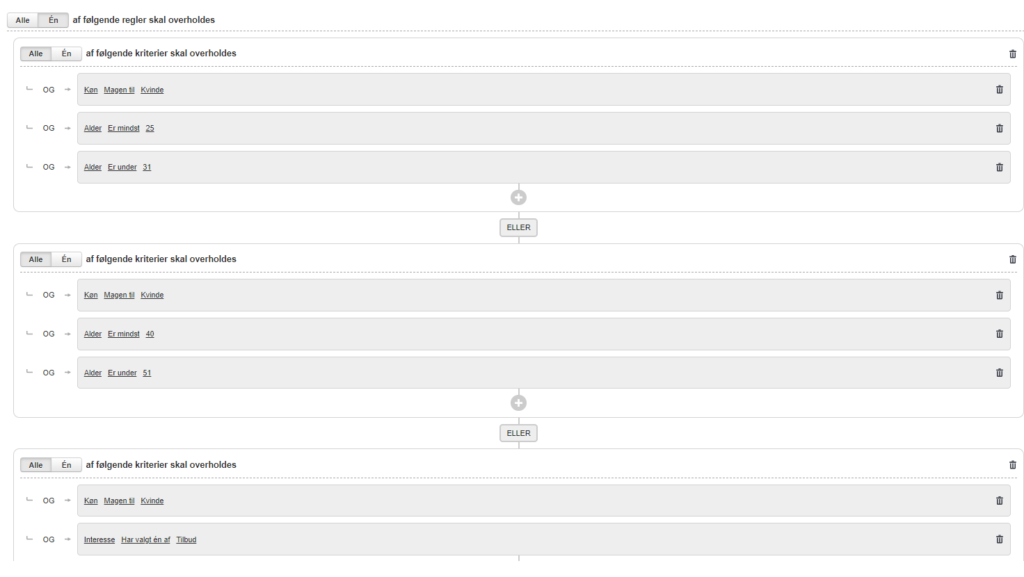
In the example above, there are three individual rules that together make up the segment.
When performing “And/Or” segmentation, you need to determine whether all rules and criteria must be met. For each rule and each criterion, you can specify whether “All” or “Any” must be met. You set this at the top of the rule and at the top of each criterion.
Rules

If you select “All, “ then all rules in the segment must be met for a member to be included in it. If you select “One, “ the member need only meet one of the rules to be included.
Criteria

If you select “All, “ a member must meet all the criteria in the rule to be included in it. If you select “One, “ the member need only meet one of the criteria to be included.
Criteria with subrules
In our Segment Builder, you can insert pre-created segments and flow conditions into a criterion.
This allows you to create sub-rules for your criteria, which can result in highly precise segmentation—leading to better results for your email marketing, since you’ll be communicating relevant messages to your recipients (rather than sending the same message to everyone).
You can insert a segment or flow condition by creating a new rule:
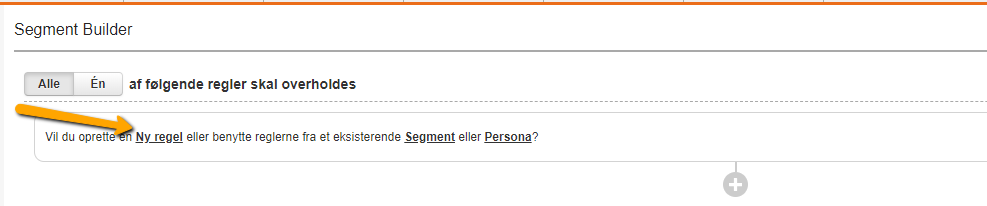
Next, use the rules from an existing segment or flow condition:
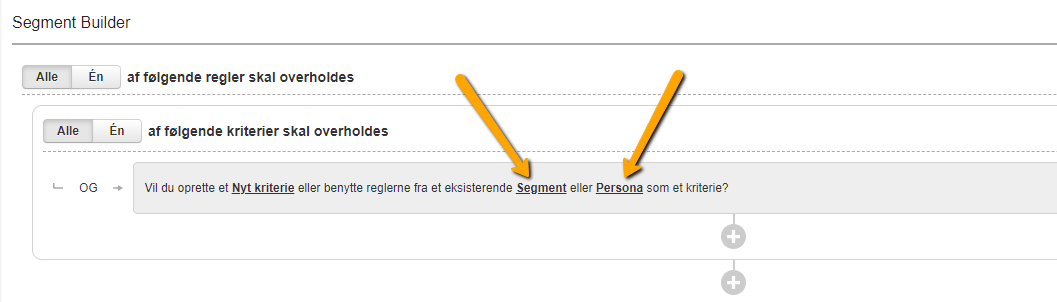
Once you do this, your rule will look like this:
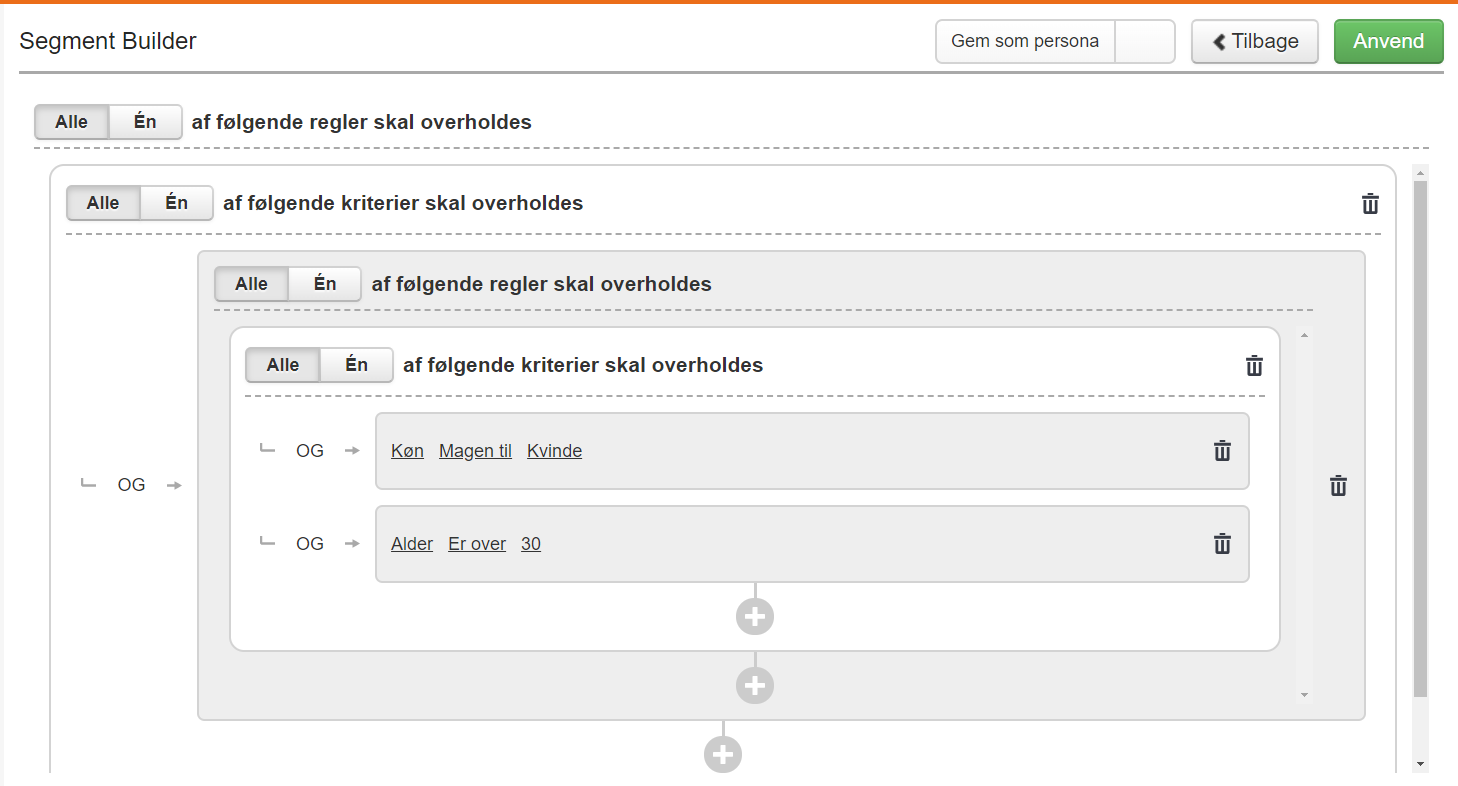
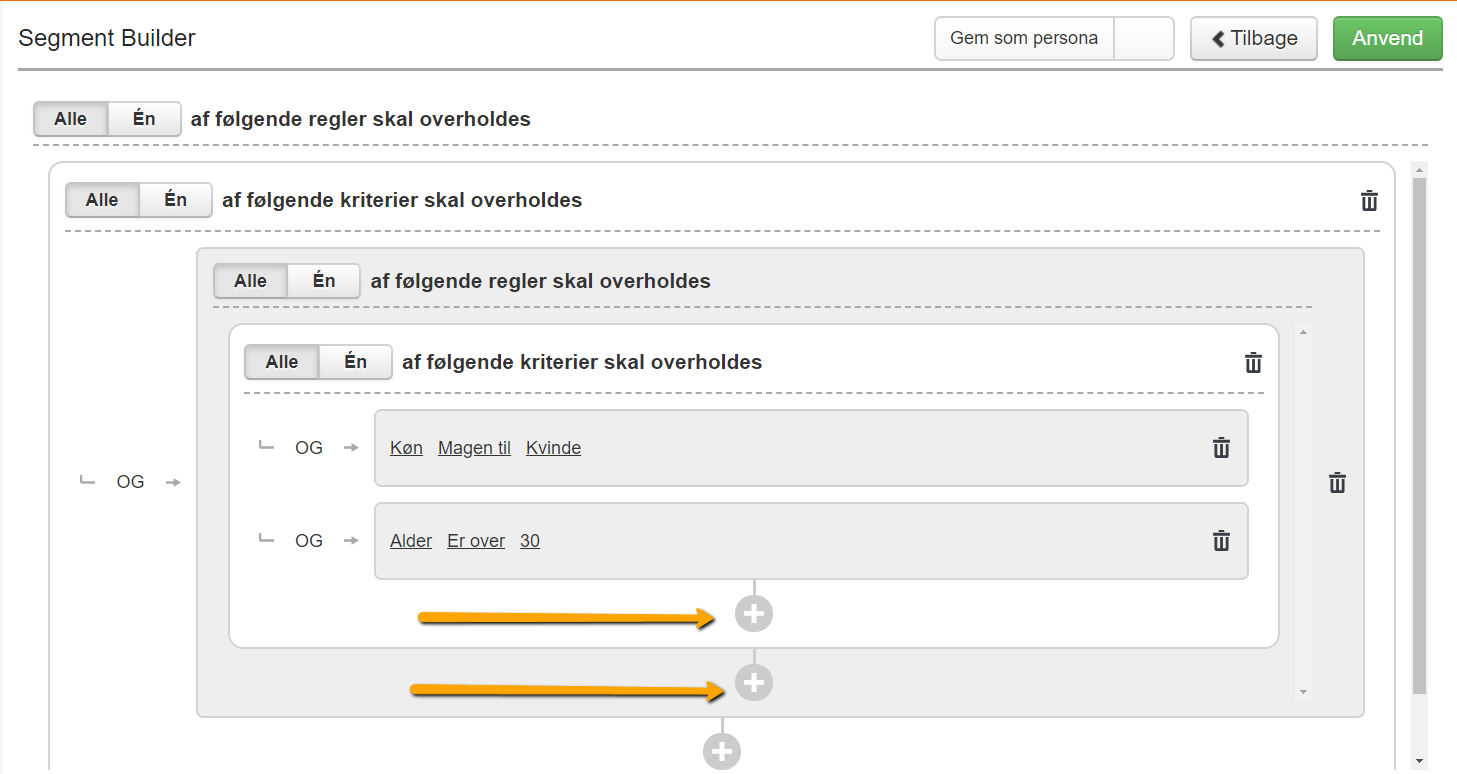
Once you’ve inserted the rules from a segment or a flow condition, they become your subrules. They are located one level deeper than if you were to create a new criterion. You can add more criteria and rules to your subrule. To do this, click the plus icons inside the subrule.
If you add something inside the white element, it’s a new criterion for the rule. If you add something inside the gray element, it’s a new rule within the subrule.
What can you use subrules for?
Subrules are useful if, for example, you’re doing “And/Or” segmentation. This is because you can narrow down your segment even further than if you were to use only rules and criteria.
An example of the use of subrules could be, for example:
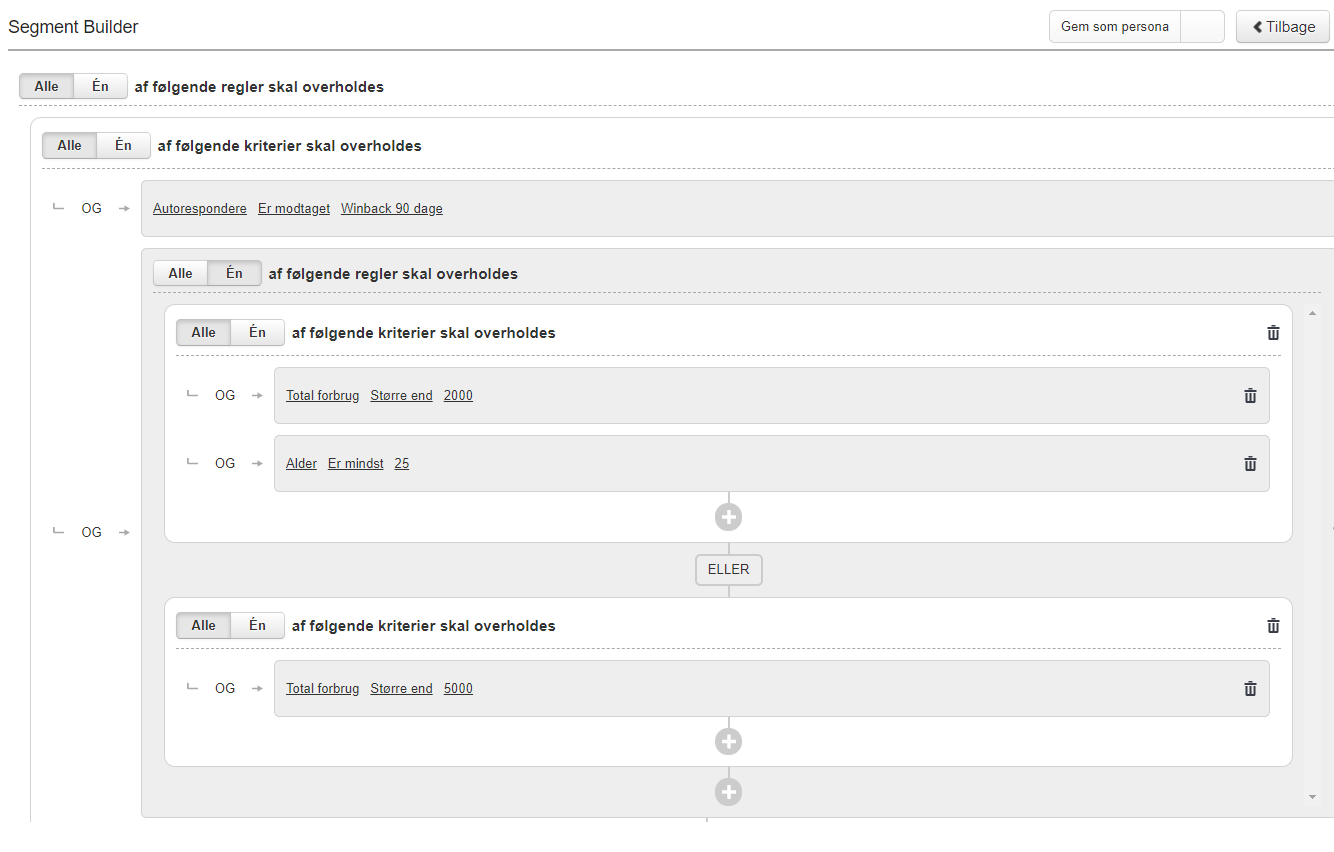
In the example, a segment has been inserted that contains the following rules:
- Total consumption must be greater than 2,000, and you must be at least 25 years old.
Or
- Total consumption must be greater than 5,000
This segment is included in a rule that contains the following criterion: The “Winback 90 Days” automation has been received
Examples of Advanced Segmentation
There are 3 concepts that will help you get better at building advanced segments, if you already have a handle on simple segmentation.
The three concepts are:
- Tracking data
- Exclusion
- Segment in segment
The final part is combining the three concepts into one segment.
See below for examples of each of the three concepts, as well as an example of combining all the concepts into a single segment. If you’re unsure about the basics of how to build a segment, we recommend that you read this guide.
Tracking data
Tracking data consists of behavioral and purchase data that you have collected, among other things, through user behavior on your website. All tracking data can be found in Heyloyalty’s activity feed, which is located under the “Statistics” menu item.
In general, you build tracking segments by selecting an action and when that action took place.
Tracking – Action – Has viewed
Tracking – Action date – Is less than – 3 days ago
A segment like this includes everyone who has viewed something on your site within the last 3 days.

The next logical step is to narrow down what they’ve viewed by adding another condition requiring that the contact must have viewed a category that contains the word “annual pass”:
Tracking – Category name – Contains – Annual pass.

As a result, the segment now includes all users who, within the last 3 days, have viewed a product in the “annual pass” category.
Exclusion
Exclusion is another useful concept for creating more precise segments. However, you need to make sure you’re excluding the right contacts.
An example would be to create a segment that includes everyone with an address east of the Great Belt but excludes Greenland. Greenlandic ZIP codes all fall within the range from 3900 (Nuuk) through 3992 (Kulusuk).
It is built like this:

Segment in segment
Here we can build a segment that is very similar to the one above, but built in a different way.
This time we will affect everyone living east of the Great Belt, where Greenland is excluded.
Start by building the following:
Postcode – Greater than or equal to – 1000
Postcode – Less than or equal to – 4999

Then click + and instead of selecting New criterion, select Segment.

Now select the segment you want to insert. In this case, we select the segment ‘Greenlandic postcodes’, which is made as:

Postal code – Greater than or equal to – 3900
Postal code – Less than or equal to – 3992
And to refer back to the Exclusion section, the ‘Greenlandic postcodes’ segment is excluded.

Group all concepts into a segment
If we combine the 3 different concepts into one segment, it could look like the example below.
The segment contains contacts who have made a purchase within the last 14 days, live on Zealand (and Greenlanders are excluded). The purchased product is in the category ‘annual pass’
It will look like this:
Tracking – Action – Has purchased
Tracking – Action date – Is less than – 14 days ago
Tracking – Category name – Contains – Annual pass
Inserted segment, which is excluded:
Postcode – less than or equal to – 3799
Postcode – greater than or equal to – 3700
Inserted segment, which is included:
Postcode – less than or equal to – 4999
Postcode – greater than or equal to – 1000


Hvis du mangler information eller hjælp, som du ikke finder her på guide sitet, er du altid velkommen til at kontakte vores support!
support@heyloyalty.com / tlf. 87 300 399